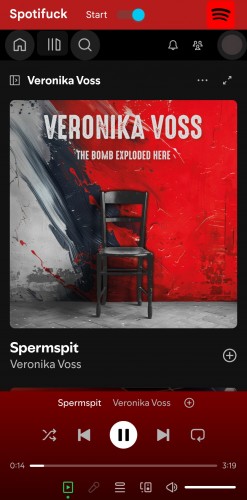
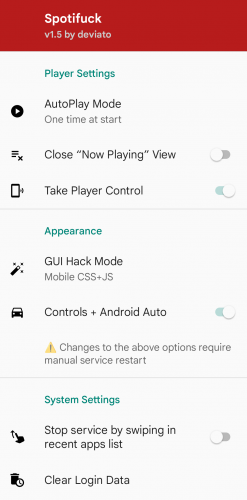
Digital audio streaming has transformed how the world consumes music, yet users are increasingly restricted by rigid paywalls, aggressive tracking algorithms, and intrusive advertisements. While standard subscription models offer a gatekept solution, advanced users and open-source enthusiasts often seek ways to optimize their mobile streaming layout. Enter Spotifuck, a community-driven, privacy-centric Android WebView wrapper designed to run the official Spotify Web Player completely ad-free with premium-like features.
NEW v1.6.4 What's New
- ● Fixed "Now Playing Sidebar" width and overflow for small screen devices
- ● Added active/inactive green color to Now Playing Button
- ● Other minor UI fixes and optimizations
Key Features & Takeaways
- 100% Ad-Free Audio & Visuals: No audio advertisements and no display banners in the app.
- Unlimited Skips & Seeking: Bypasses skip limits and enables custom track seeking.
- No Forced Shuffle: Full play control to select and stream any song, just like desktop.
- High Quality Podcasts: Streams podcasts at 128kbps AAC vs only 96kbps OGG on official free app.
- No Empty Playlists: Fixes loading issues for large, custom playlists.
- Android Auto & Controls: Support for Android Auto and system media notification controls.
- Zero Telemetry Tracking: Strips background profiling scripts and tracking cookies.
By engineering a custom WebView container wrapper around the official web player, Spotifuck acts as an injection layer at runtime. It removes artificial limits, filters promotional streams, and stops diagnostic tracking, all while letting you use your standard playlist layouts and account metadata. Below, we break down exactly how it works, what makes it different from similar tools, and how to set it up.
What is Spotifuck?
At its architectural core, Spotifuck is an open-source WebView wrapper and script injector for the official Spotify Web Player. Rather than running as a standalone music-pirating service, it serves as a secure local container on Android that loads the standard web player interface. By dynamically injecting custom CSS and JavaScript scripts into the sandboxed WebView context, it blocks incoming ad requests, prevents tracking cookie placement, and unlocks features that are normally restricted in standard mobile applications.
Instead of relying on unstable native app binary patching (which breaks with every update), Spotifuck runs the web player directly. This containerized design provides significant benefits:
- Filesystem Isolation: Because it operates inside a sandboxed WebView, it cannot access your device's private storage, making it much safer than typical modded APKs.
- Stability & Maintenance: Because it interacts with standard web endpoints, the app remains stable even when Spotify's native Android client receives updates.
- Bypass Mobile Paywalls: By requesting the desktop version of the web player inside the wrapper, it naturally enables select-and-play and unlimited skips.
Technical Architecture and How It Works Under the Hood
Under the hood, Spotifuck works by intercepting network requests before they reach your screen. When the Spotify Web Player loads, dozens of background connections fire simultaneously — fetching metadata, pinging ad servers, registering telemetry, and pulling the actual audio stream from a CDN. Spotifuck sits in the middle of this pipeline and filters out everything you don't want.
(Blocks Telemetry & Ad Requests)
1. Script Injection and DOM Manipulation
When the app starts, it runs a custom JavaScript snippet inside the WebView. This script watches the DOM as elements load and checks each one against a list of known ad containers — banner slots, promotional panels, and upsell popups. Any matching element gets hidden before it renders, leaving you with a clean, fast interface.
2. Request Hooking and API Mimicry
The application overrides native network fetch commands (window.fetch and XMLHttpRequest). When the platform tries to call a background analytics endpoint—such as logging how long you hovered your mouse over a specific track or sending behavioral tracking telemetry—the tool redirects that packet to a dead local route (localhost or null). However, when a legitimate request for user playlists, saved albums, or track listings is initiated, the packet passes through cleanly, maintaining your personalized catalog without friction.
3. Audio Stream Emulation
The audio itself streams directly from Spotify's official CDN using standard web playback APIs — nothing is rerouted or pirated. Because Spotifuck strips out ad-related overhead and unnecessary UI re-renders, it uses less CPU and memory than the native app, making it ideal for older phones or background listening.
Key Features and Capabilities
The development roadmap of Spotifuck focuses on three fundamental pillars: UI clarity, behavioral privacy, and performance optimization. Below is an exhaustive breakdown of the core mechanics integrated into the current software build.
Ad-Free Playback
Unlike basic browser blocklists, Spotifuck intercepts and filters mid-song audio ads as well as visual display banners. The app itself contains absolutely no ads.
- • Token Isolation: Skips promotional spots automatically.
- • Visual Stripping: Removes homepage banner ads and sidebars.
Premium-Like Navigation
Bypass free mobile restrictions. Enjoy premium track-navigation privileges normally disabled on standard free accounts.
- • Unlocked Seeking: Scroll and scrub through tracks freely.
- • Unlocked Shuffle: Play any track directly without forced shuffling.
High-Quality Audio & Podcasts
Get better audio resolution for your podcast library compared to the official free app wrapper limitations.
- • 128kbps AAC Streams: Clearer podcast stream resolution.
- • 96kbps OGG Comparison: Bypasses official app compression limits.
Android Auto & Media Center
Integrates directly into your Android Auto car console and standard system notification media player tray.
- • Media Controls: Pause, skip, and check tracks from notification shade.
- • Car Dashboard: Access playlists on the go in Android Auto.
Never Expiring Wrapper
Built directly on top of the Spotify open web player, ensuring independent operation that survives updates.
- • Longevity: Avoids the weekly update cycles of typical modded APKs.
- • No Empty Playlists: Keeps your massive personal playlists loading cleanly.
Telemetry Prevention
Spotify tracks skip counts, listening hours, and hardware specs. Spotifuck protects your listening habits:
- • Outbound Blocking: Stops logging requests to analytics servers.
- • Sandboxed Storage: Restricts tracking cookies inside the WebView.
⚠️ Android Auto Warning: If you plan to use Android Auto, please disable or uninstall the official Spotify app first. Otherwise, both players enter a race condition to take control of the media service!
Ready for an ad-free experience?
Join thousands of users who have already switched to Spotifuck.
Download Spotifuck AppSpotifuck vs. Standard Alternatives
When deciding how to configure your daily media setup, it helps to analyze how customized open-source web layers stack up against default configurations and commercial solutions.
| Operational Feature | Spotify Free Tiers | Spotify Premium | Spotifuck Open Client |
|---|---|---|---|
| Audio Advertisements | Persistent (Interruptive) | None | Completely Blocked |
| Banner/Display Ads | Present (High UI Clutter) | None | Completely Stripped |
| Telemetry & Tracking | Active Tracking Enabled | Active Tracking Enabled | Completely Disabled |
| UI Theme Adjustments | Restricted to Defaults | Restricted to Defaults | Fully Customizable (CSS) |
| System Resource Cost | Moderate to High | Moderate to High | Minimal (Lightweight) |
| Account Portability | Native | Native | Ephemeral / Sandbox-Safe |
Comprehensive Installation & Setup Guide
Follow these steps to set up Spotifuck on your Android device (requires Android 5.0+ and Android System WebView v121+):
Check System Requirements
Prerequisites: Spotifuck operates through an integrated WebView modified to look like a PC desktop browser. Ensure you are running a recent version of **Android System WebView (v121+)** or an updated Google Chrome app. For custom ROMs, webviews like Mulch or Vanadium are also supported.
Install the APK Package
Installation: Download either the Standard or Censored version from our download page. Sideload the APK file onto your device (enable "Install from Unknown Sources" if prompted by your browser or file manager).
Log In (OTP Flow)
First Run: Launch the app. You will be redirected to the Spotify login page. Log in preferably using your email. Press "Continue" ONLY ONCE and wait for the OTP verification code to be sent. Enter the code and wait 20 to 30 seconds for the player to boot and apply mobile CSS hacks (enabled by default).
Start Playback & Unlocker Initialization
First Play: Go to your library, select a track, and press play ONLY ONCE. The first track may freeze on first boot or when the service restarts. Simply wait a moment; the internal Unlocker will skip to the next track, after which you can skip back to the previous track and play normally.
Interface & Control Options
Spotifuck is a flexible wrapper that gives you multiple interface choices depending on your phone's screen size and layout preferences:
- CSS Hack UI (Default): This feature is enabled by default and dynamically fits the PC browser Spotify layout onto mobile displays. Because it is a responsive adaptation of the heavy desktop web player, animations might feel a bit jerky on older devices.
- Wide Window UI: Can be activated in the options, rendering the player in a wider landscape viewport suitable for tablets or larger screens.
- Official App Controller: If preferred, you can run Spotifuck in the background and use the official Spotify app (via Spotify Connect) on another device or standard launcher shortcuts to control playback.
Deep Dive: The Open-Source Alternative Ecosystem
Understanding the context of Spotifuck requires looking at how the global open-source community approaches audio modification. Developers worldwide have long collaborated on alternative applications, creating an interconnected ecosystem of tools designed to maximize user control over their media pipelines.
1. Network-Level Patching vs. Client-Side Injection
Tools like SpotX work by running PowerShell scripts on Windows to directly patch the Spotify desktop app's binary files. It's effective, but you need admin access and have to re-run the patcher every time Spotify auto-updates.
Spotifuck takes a completely different approach — it runs entirely inside a browser tab, so it never touches any files on your device. Nothing gets patched or overwritten. This makes it portable across Android, Windows, macOS, and Linux, and it doesn't break when Spotify pushes updates.
2. External Resource Routing and Metadata Extraction
Other community applications, such as Spotube, take a completely separate architectural path. Instead of interfacing directly with official audio streams, they use native APIs exclusively as a directory to read metadata—such as playlist titles, artist track lists, and track durations. Once the catalog data is read, the application automatically queries decentralized public frontends (like Invidious, Piped, or YouTube audio engines) to pull down the matching song.
While this entirely separates the user from the official audio distribution system, it introduces a separate set of trade-offs: live performance cuts, variant cover tracks, or missing album versions due to automated matching discrepancies. Spotifuck preserves matching accuracy because it sources data tracks directly from primary nodes, ensuring you hear the exact studio master intended by the content creator.
3. Lossless Stream Aggregators
Projects like SpotiFLAC target a different niche: high-fidelity archive creation. These tools trace metadata links and run them through high-resolution databases (such as Tidal, Deezer, or Qobuz APIs) to pull down uncompressed FLAC files for local media management. Spotifuck, by contrast, is designed for everyday, real-time streaming, prioritizing zero-configuration speed, fluid interface rendering, and continuous background music delivery without filling up local storage drives.
Ecosystem Comparison Summary
- Spotifuck: Best for real-time, browser-based ad-free streaming.
- SpotX: Best for deep Windows-native binary patching.
- Spotube: Best for decentralized, multi-source playback.
- SpotiFLAC: Best for high-fidelity offline archiving.
Security, Privacy, and Trust Assessment (EEAT)
Any time you use third-party software that touches your accounts, security matters. Here's how Spotifuck handles safety, and what you should keep in mind.
1. Source Code Transparency & GitHub Repository
Spotifuck is fully open-source — you can read every line of code, inspect the resources, and audit the manifest in the community repository at GitHub (lyssadev/Spotifuck_src). This transparency means the community can verify there's no hidden credential theft, crypto miners, or data exfiltration. Always download from the official source at spotifuck.app — avoid random APK mirror sites.
2. False Positives in Antivirus Suites
When installing lightweight application wrappers or deploying manual WebView packages, mobile security filters or local antivirus suites (like Play Protect or Windows Defender) may occasionally flag the installer. This occurs primarily because the package is self-signed and utilizes client-side script injection techniques to block ad elements.
To guarantee total safety: cross-verify your download MD5 hashes against the official release distributions, scan files via independent tools like VirusTotal, and run code inside sandboxed test parameters if you prefer absolute verification before installing it on your primary device.
3. Compliance and Account Safety Profiles
Using any unofficial client technically goes against Spotify's Terms of Service — you should be aware of that. While browser-based ad blocking is a normal browser function, Spotify does monitor for unusual account activity—such as skipping 50 tracks in a single second or fetching massive metadata sets concurrently.
To keep your primary profile entirely safe from potential flag events or temporary account restrictions:
- Use the client naturally and avoid running automated macro scripts that disrupt normal playback cycles.
- Ensure your client is kept up to date to preserve clean API handshakes.
- Consider utilizing a secondary or alternative user profile if you prefer absolute isolation for experimental browsing.
Common Problems & Troubleshooting
If you experience setup or playback issues, check below for quick resolutions. Click each question to expand the answer:
Can't log in, stuck loading, or the page keeps refreshing?
This is almost always caused by an outdated WebView provider in your Android ROM. Update **Android System WebView** or your **Google Chrome** app from the Google Play Store. For custom ROMs, you can try alternative WebView providers like Mulch or Vanadium (depending on ROM support) and select it as the default provider in your Android Developer settings.
The play button is disabled / "Spotify can't play this right now"?
If the controls remain locked, stop the Spotifuck service, wait a few seconds to let background processes clear, and then restart the application.
All tracks skip automatically or play for only 10 seconds before silence?
This restriction is automatically placed by Spotify if you create an account using a disposable or temporary email address. To resolve this, simply sign up or log in using a legitimate email address (such as Gmail, Outlook, or Proton).
Frequently Asked Questions
Is Spotifuck completely free to use?
Yes, 100% free. Spotifuck is open-source, community-maintained, and every feature is available in the standard build. No hidden paywalls or premium tiers.
Do I need a rooted phone or an administrative jailbreak to install it?
No. Spotifuck runs as a standard Android app using the built-in WebView engine. No root access, bootloader unlock, or special permissions needed.
Can I download music tracks directly for offline storage?
No, Spotifuck is built for real-time streaming only — it doesn't download or save music files. If you need offline downloads, check out dedicated tools like SpotiFLAC or Spotube.
What should I do if the player stops loading songs after an update?
Because streaming platforms occasionally update their web player's internal HTML structure. Just come back to Spotifuck.app, download the latest version, and you'll be back up and running.
Will using this modification harm my hardware or leak my personal information?
No. Spotifuck actually reduces your data exposure by blocking the analytics and tracking the official app normally sends. Your login credentials stay in the local WebView storage and are only sent to Spotify's own authentication servers.